Architecture Slice + Arc + Pulse ↔ IBM TM1
This page describes the full architecture of how Cubewise products (Slice, Arc, and Pulse) integrate with IBM TM1.
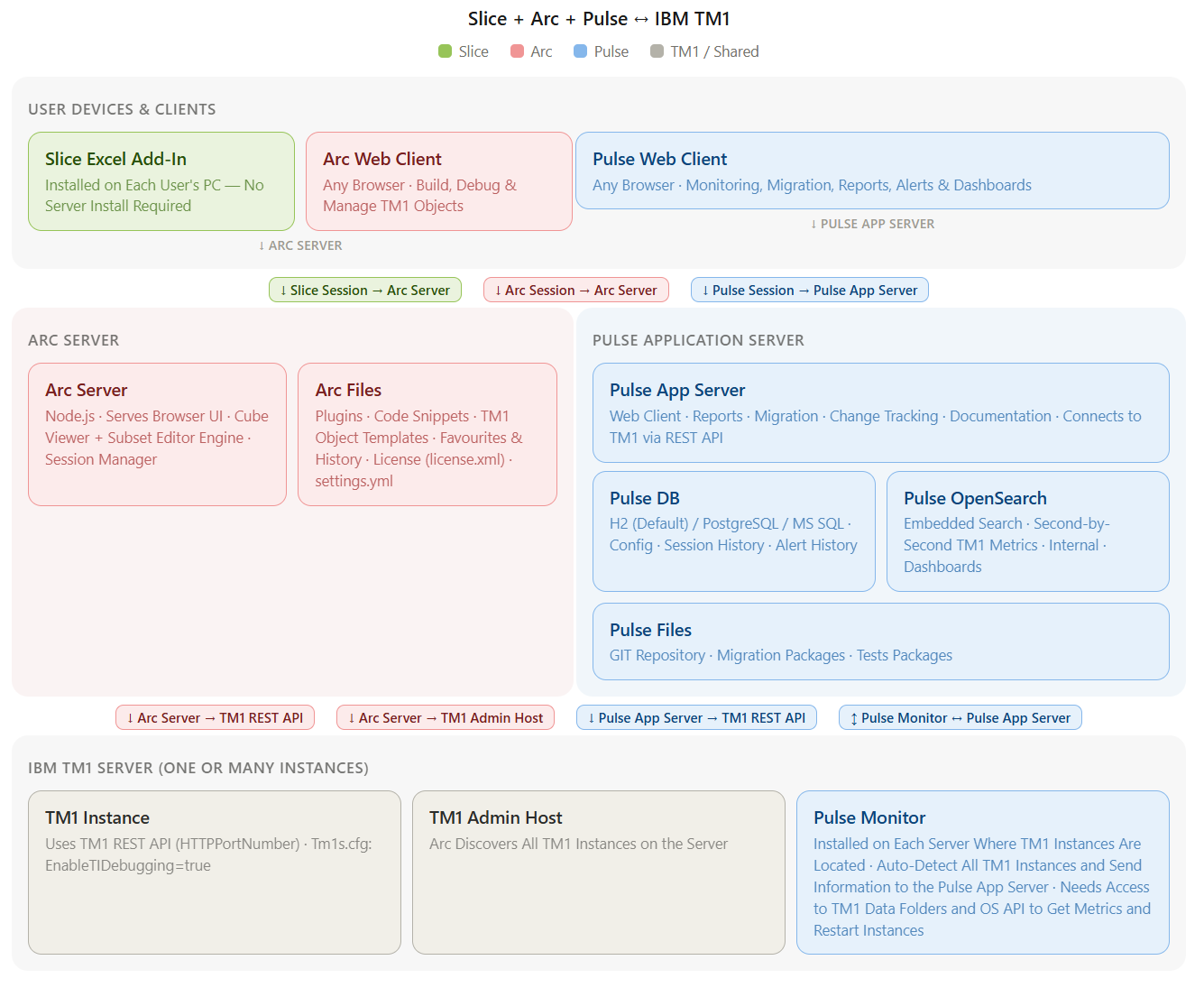
architecture.html:
Detailed Descriptions
User Devices & Clients
Users interact with the Cubewise stack through three client applications, each connecting to its corresponding server component.
Client | Connects To | Description |
|---|---|---|
Slice Excel Add-In | Arc Server | Installed on each user's PC — no server install required. Connects to the Arc Server for session management and UI components. Used by finance users for DBSW/DBRW functions, Active Forms, and Cube Viewer & Subset Editor inside Excel. |
Arc Web Client | Arc Server | Any modern browser. Used by TM1 developers to build, debug, and manage TM1 objects such as rules, processes, dimensions, and hierarchies. |
Pulse Web Client | Pulse App Server | Any modern browser. Used by IT and TM1 admins for monitoring dashboards, migration tools, reports, alerts, security settings, and documentation. |
Arc Server (Cubewise Arc Server)
The Arc Server hosts the web-based development and administration environment for TM1.
Component | Description |
|---|---|
Arc Server | A Node.js application that serves the Arc browser UI. It includes the Cube Viewer and Subset Editor engine, and manages user sessions. Slice also connects here for its UI components. |
Arc Files | Stores plugins, code snippets, TM1 object templates, user favourites and history, and the Arc license file (license.xml). TM1 instance configuration is managed via settings.yml. |
Pulse Application Server
The Pulse Application Server provides monitoring, change tracking, migration, and reporting capabilities for your TM1 environment.
Component | Description |
|---|---|
Pulse App Server | The main Pulse web application. Provides reports, migration tools, change tracking, and documentation. Connects to TM1 via the REST API. |
Pulse DB | An embedded H2 database by default (PostgreSQL and MS SQL are also supported). Stores Pulse configuration, high-level TM1 info, session history, and alert history. |
Pulse OpenSearch | An embedded search engine that stores second-by-second TM1 metrics. Powers the Pulse Explorer dashboards. Internal only. |
Pulse Files | Contains the GIT Repository (every TM1 object change saved with full diff and rollback), Migration Packages, Tests Packages and Pulse Configuration. |
Connections Between Arc Server and Pulse Application Server
Arc and Pulse are linked together. Arc can show the Pulse Flow Diagram for any TM1 object dependency, providing developers with immediate visibility into the impact of changes.
Connections to IBM TM1 Server
The Arc Server connects to TM1 via the TM1 REST API and can discover instances via the TM1 Admin Host. The Pulse App Server also connects to each TM1 Instance via the TM1 REST API. The Pulse Monitor communicates bidirectionally with the Pulse App Server to send metrics and receive commands.
IBM TM1 Server (One or Many Instances)
The core IBM TM1 infrastructure. One physical or virtual server can host multiple TM1 instances. All Cubewise tools connect to TM1 exclusively through the TM1 REST API.
Component | Description |
|---|---|
TM1 Instance | Each TM1 instance uses the TM1 REST API (HTTPPortNumber) as the single connection point for all tools — Arc, and Pulse all connect via this API. |
TM1 Admin Host | Arc can discover all TM1 instances on the server. |
Pulse Monitor | Installed on each server where TM1 instances are located. Auto-detects all TM1 instances and sends information to the Pulse App Server. It needs access to TM1 data folders and the OS API to get metrics and restart instances. |
TM1 Security | Slice uses your existing TM1 credentials, there is no separate Slice login. All TM1 security rules are enforced at the cube, element, and cell level. This is an inherent part of TM1 and is not shown as a separate component in the architecture diagram. |
Key Ports and Protocols
Port | Protocol | Used By | Purpose |
|---|---|---|---|
7070 | HTTPS | Slice, Arc Web Client | Client connections to Arc Server (Slice Sessions and Arc Sessions) |
xxxx | HTTPS | Arc, Slice, Pulse | TM1 REST API (HTTPPortNumber) — the single entry point for all Cubewise tools to communicate with each TM1 Instance |
8099 | HTTPS | Pulse Web Client, Pulse Monitor | Pulse App Server (browser sessions and metrics upload from Pulse Monitor) |
5898 | Internal | Arc | TM1 Admin Host: used by Arc to discover TM1 instances on the server |
9200 | Internal | Pulse (Internal) | Pulse OpenSearch — stores time-series TM1 metrics for dashboards |