Upgrading The Pulse Application Server
This article explains how to upgrade Pulse. Before upgrading Pulse, it is good practice to Backing up Pulse.
Upgrading a centralized Pulse application server
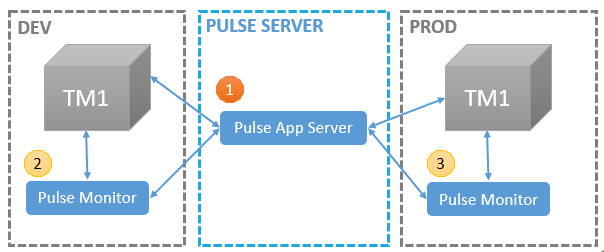
If you have chosen to use a centralized Pulse Application Server to monitor multiple TM1 servers (DEV and PROD), you will have to:
Run the new Pulse installer on the server where the Pulse Application Server is installed. The installer will uninstall the current version and install the new one.
Upgrade the Pulse Monitor on the DEV server
Upgrade the Pulse Monitor on the PROD server (repeat this step for each Pulse Monitor)
Steps 2 and 3 (upgrading the Pulse Monitor) will not be required for each Pulse release. If it is not specified in the release notes then upgrading Pulse requires only one step (1).
Upgrading Pulse on each TM1 server
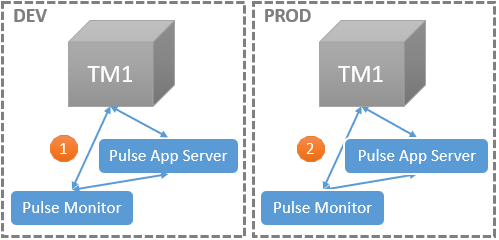
When Pulse App Server is installed on each TM1 server, to upgrade Pulse, you will have to run the installer on each server.