Metadata Step by Step
Now let’s move to the Metadata tab. In this tab, we are going to setup the hierarchy:
Total Department
Department
Employee
First, we need to insert new elements using HierarchyElementInsert and then we add the components to the consolidations using HierarchyElementComponentAdd.
Copy the code below:
Usually, the Epilog tab is used to delete any temporary objects created during the process, but because the subset Bedrock process will take care of this, we won’t need to code any clean up functionality.
Save and then execute the process.
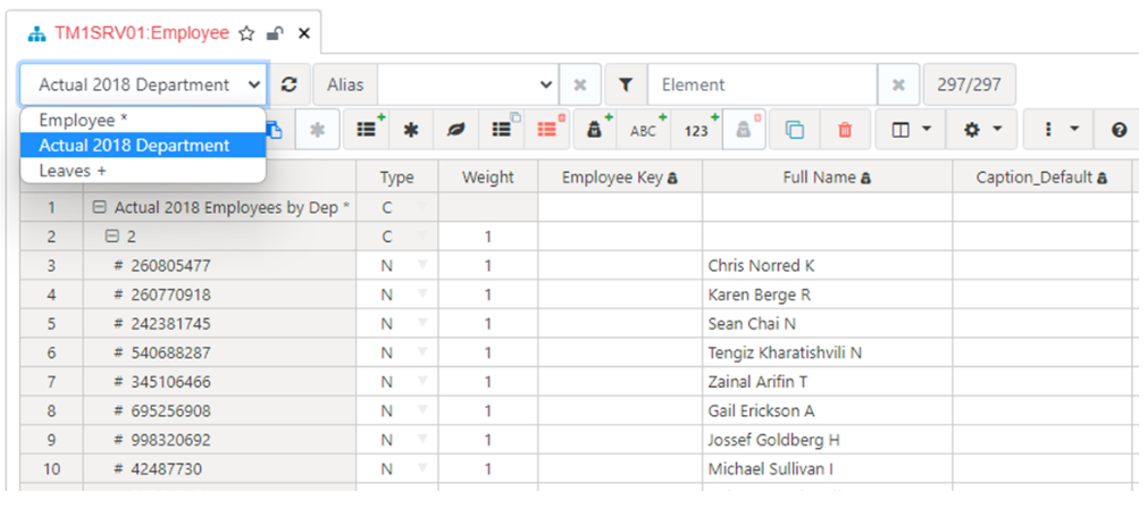
Open the Employee dimension. If it was already open, refresh your web browser to get the last changes. In the hierarchy dropdown, you should be able to see the new hierarchy ‘Actual 2018 Department’: