Email with OAuth Authentication
From this version onward, additional support has been added for OAuth. As of this release, it has been tested to work with Microsoft Graph.
The following information is required for this setup,
OAuth URL Endpoint for sending Email
Client ID
Client Secret
Well Known Configuration URL / Discovery Endpoint
Email Address allowed as the sender of the emal
The following scopes are required
openid
For user and email verification
email
For email verification
offline_access
For Refresh Token retrieval
The following API Permissions has been setup for this application,
User.Read
For delegation/offline access
Mail.Send
For sending email
Below is a screenshot with the information provided,
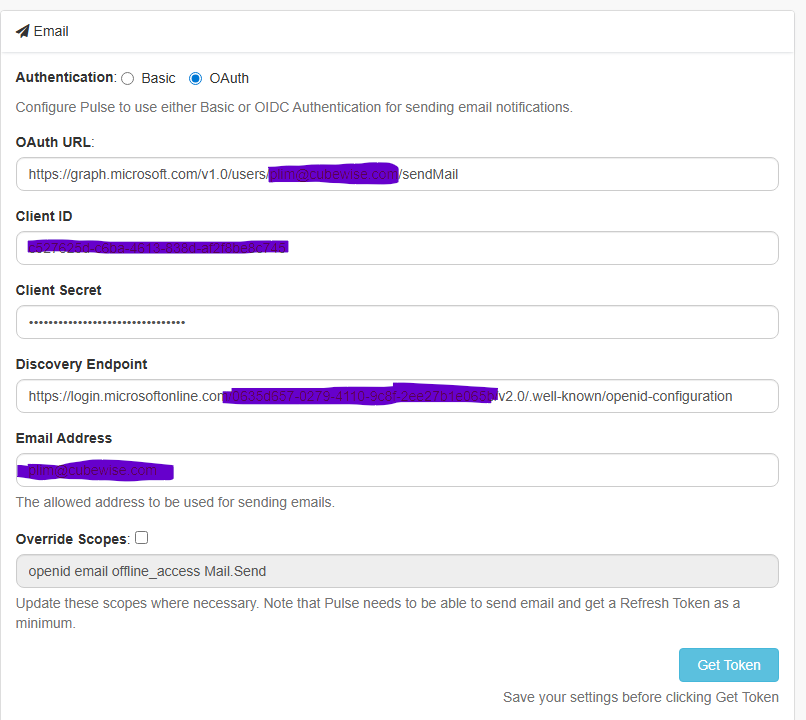
The scopes are based off Microsoft’s Graph API setup via Microsoft Entra. It may differ with other providers like the rest of the information here. However, scopes can be updated if needed.
Overall, the steps would be,
Select “OAuth“

Fill up the rest of the information similar to the earlier screenshot (ClientID, ClientSecret, etc.)
Click on the Save button
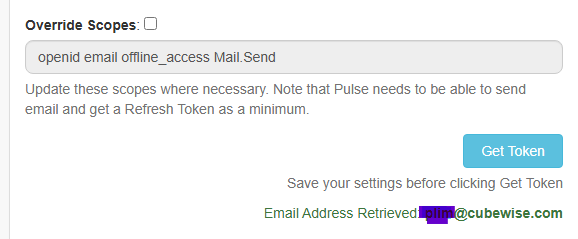
Finally, click on the Get Token button which should show the email address if Access Tokens and Refresh tokens are successfully retrieved