Assertions
Each Unit Test can have a list of Assertions. Assertions define the criteria to determine whether a Unit Test passes or fails.
Assertions are executed from top to bottom in the order given. Once any Assertion fails, the Unit Test fails and no further Assertions are checked.
You can access the list of Assertions from the Edit Unit Test dialog by selecting the Assertions tab.
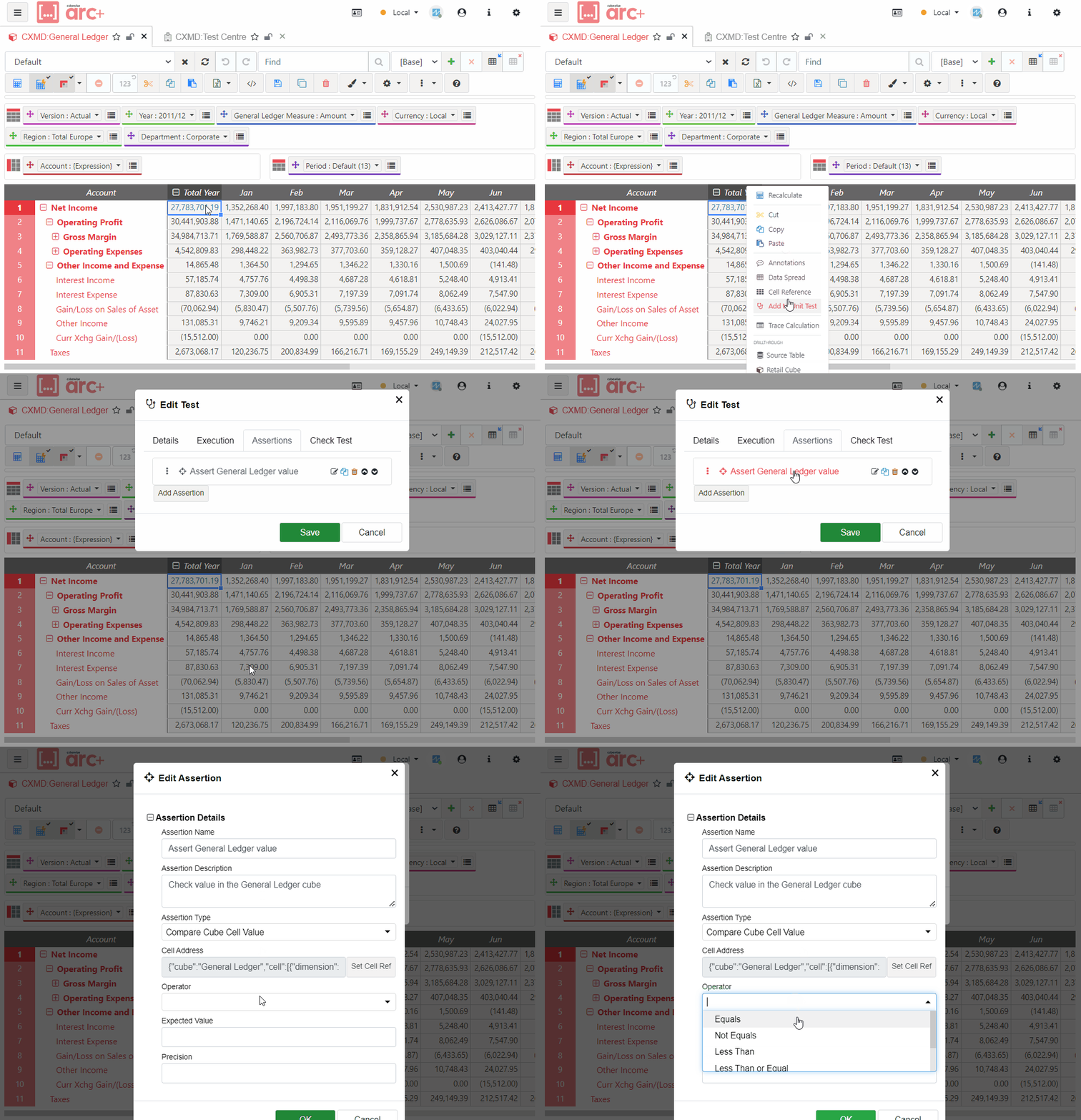
Properties
Label: (
Label string) A human-readable name for the assertion. This is used in test reports and logs to identify the assertion.Description: (
Description string) A detailed explanation of what the assertion is checking. This helps in understanding the purpose of the assertion, especially in complex tests.Assertion Type: (
AssertionTypeID string) A reference to the type of assertion being made. This determines how the assertion is executed and how its results are interpreted. The value should correspond to a registered Assertion Type.Assertion Properties: (
AssertionParameterValues []AssertionParameterValue) A list of parameters that further specify the assertion. These parameters can influence how the assertion is executed and how its results are interpreted. The exact parameters available depend on whichAssertion Typeis selected. See Assertion Types for more detail.
Assertion Types
Check Action Result
This assertion type checks if the result of running the target Action compares correctly to the expected value.
Parameters:
Operator: The operator to apply to the Action result.
Expected Value: The expected value of the Action result. Select one of:
CompletedSuccessfully (0): The execution of the unit test action completed without any detected errors.Aborted (1): The execution of the unit test action was aborted before completion.HasMinorErrors (2): The execution of the unit test action completed with minor errors.QuitCalled (3): The 'Quit' function was called during the execution of the unit test action, causing it to stop. This applies only to TI Processes.CompletedWithMessages (4): The execution of the unit test action completed, but there were messages generated during the process. This applies only to TI Processes.RollbackCalled (5): The 'Rollback' function was called during the execution of the unit test action, undoing any changes made during the process. This applies only to TI Processes.
Compare Cube Cell Value
This assertion type checks if the value of a specified cell address compares correctly to the expected value.
Parameters:
Cell Address: The address of the cell to check. The cell address should resolve to a numeric value in the TM1 cube.
Operator: The operator to apply to the variable.
Equals: Checks if the numeric value is exactly equal to the expected value.Not Equals: Checks if the numeric value is not equal to the expected value.Less Than: Checks if the numeric value is less than the expected value.Less Than or Equal: Checks if the numeric value is less than or equal to the expected value.Greater Than: Checks if the numeric value is greater than the expected value.Greater Than or Equal: Checks if the numeric value is greater than or equal to the expected value.
Expected Value: The expected value of the variable. This is a floating point number.
Precision: The number of decimal places to use in the comparison.
Inspect Dimension Element
This assertion type checks if a specified property of a specified dimension element matches the expected value.
Parameters:
Element Reference: The selected element to check. This specifies a single Element in a Dimension.
Value Source: The source of the value to compare.
Principal Name: The primary name of an element.Element Index: The order index of an element within the Dimension.Parent Count: The number of parent elements that the selected element has.Child Count: The number of child elements the selected element contains.
Operator: The operator to apply to the variable.
Equals: Checks if the string is exactly equal to the expected value.Not Equals: Checks if the string is not equal to the expected value.Contains: Checks if the string contains the expected value.Does Not Contain: Checks if the string does not contain the expected value.Starts With: Checks if the string starts with the expected value.Ends With: Checks if the string ends with the expected value.
Expected Value: The expected value of the variable. This is a string, but for
Element Index,Parent Count&Child Countmust resolve to a valid integer.
Inspect Subset Elements
This assertion type checks if elements returned from an MDX subset meet the specified criteria.
Parameters:
Subset Reference: The MDX string for the subset to check. This should resolve to a Subset.
Operation: The Subset operation to apply to the returned Element list.
Count: The total number of Elements returned by the MDX string.Contains Element: Returns the index of the first Element with the specified name in the subset returned by the MDX string, or -1 if no match was found.Contains Attribute: Returns the index of the first Element containing the specified Attribute Value in the subset returned by the MDX string, or -1 if no match was found.
Expected Value: The expected value returned from the subset operation. This is a string, but must resolve to a valid integer.
Inspect Hierarchy Properties
This assertion type checks if a hierarchy property meets the specified criteria.
Parameters:
Hierarchy Reference: The Hierarchy to check. This should specify a single Hierarchy within a Dimension.
Value Source: The source of the value to compare.
Exists: Checks if the Hierarchy exists within the specified Dimension and returns 1 if it does, and 0 if not.Element Count: Returns the number of Elements in the specified Hierarchy.Level Count: Returns the number of Hierarchical Levels in the specified Hierarchy.Subset Count: The total number of Subsets in the specified Hierarchy.Attribute Count: The total number of Attributes in the specified Hierarchy.
Operator: The operator to apply to the variable.
Equals: Checks if the numeric value is exactly equal to the expected value.Not Equals: Checks if the numeric value is not equal to the expected value.Less Than: Checks if the numeric value is less than the expected value.Less Than or Equal: Checks if the numeric value is less than or equal to the expected value.Greater Than: Checks if the numeric value is greater than the expected value.Greater Than or Equal: Checks if the numeric value is greater than or equal to the expected value.
Expected Value: The expected value of the variable. This is a number.