Linux - Installation
Starting with Pulse v6.1, Pulse can be installed on a Linux server. The recommended Linux version is Red Hat Enterprise Linux 8.4. Given the nature of CentOS, this may run on that environment too.
Starting with Pulse v6.5.1, Opensearch is replacing Elasticsearch and Dashboards is replacing Kibana.
This article details the step on how to install Pulse and how to run it on this OS.
Prerequisites
OS: RHEL 8.4 Onwards
Required OS Components/Libraries:
systemd
External Libraries
Graphviz (https://graphviz.org/download/ )
WHtmlToPdf (https://wkhtmltopdf.org/downloads.html )
SELinux should be set to permisive
Linux Account Requirements when running the services:
Pulse Monitor – an account with root privilege; part of the wheel group
Pulse Server – a normal non-root account
Pulse Opensearch (v6.5.1 or later) – a normal non-root account
Pulse Dashboards (v6.5.1 or later) – a normal non-root account
Pulse Kibana (v6.4.0 or earlier) – a normal non-root account
Pulse Elastic (v6.4.0 or earlier) – a normal non-root account
To add, for the TM1 server side:
TM1 services needs to be run via systemd like the example below
For the TM1 Admin server:
For the TM1 Services:
Download the Pulse installer for Linux
Go to the Cubewise Forum and download the latest Linux version, the name of the installer will usually have the linux64 in the name.
Copy/download the above file into your RHEL/CentOS environment.
Pre-Installation
Extract the contents of the zip file into a folder. To extract content, one of the ways will be:
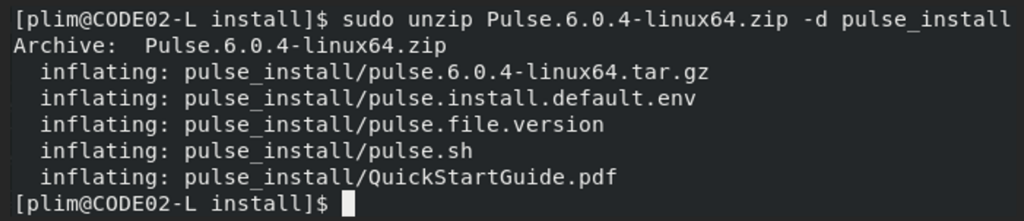
Inside the folder, you will see the above files.
You can either update the pulse.install.default.env file for the settings that will be used by Pulse during installation or create your own pulse.install.env. For the sake of being able to retain our settings for the upgrade, duplicate the pulse.install.default.env file, and rename that file into pulse.install.env.
Open your pulse.install.env file:
Fill up and update where necessary. Pay closer attention to the following and update where applicable:
Required Libraries
Pulse requires the following libraries to fully work later:
Links and instructions on how to download and install them can be found on the site. Alternatively, depending on the OS and internet connection, they can be installed through the files included on the zip file via the following sample commands (navigate to where these RPMs are):
After installation, update the following paths in the pulse.install.env file:
Installation
Navigate into where pulse.sh file is (this is in the directory where the Pulse*zip has been extracted).
To do a full/fresh installation of Pulse:
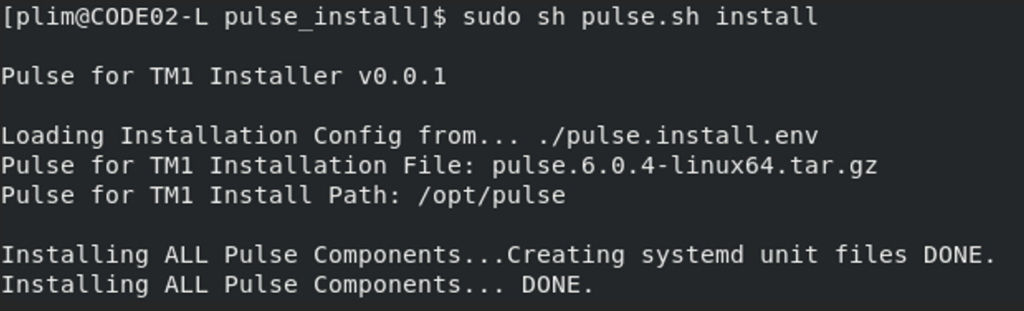
Post-Installation
Pulse services are configured by default to be executed via the systemd.
Starting and Stopping Pulse with systemd
Copy the service files from resources/system-unit-files. For example:

And paste them into your systemd directory i.e. under /usr/lib/system
After copying, you may need to reload systemd. Below is a sample command:
To stop or to start these systemd services,
Pulse Application Server
Pulse Monitor
Pulse Opensearch (Pulse v6.5.1 or later version)
Pulse Dashboards (Pulse v6.5.1 or later version)
Pulse Elasticsearch (Pulse v6.4.0 or earlier version)
Pulse Kibana (Pulse v6.4.0 or earlier version)
Uninstall Pulse on Linux
Navigate into where pulse.sh file is (this is in the directory where the Pulse*zip has been extracted).
To uninstall,