Context Menu in a Cell
When you right-click on the data area, Slice has a context menu to perform actions like Trace Rules, Drill Through and Annotations:
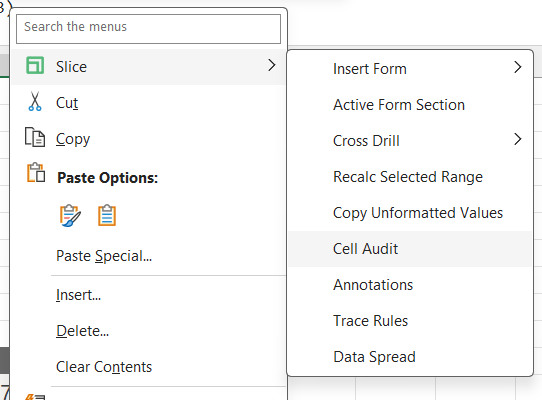
Insert Form = insert a new active form to the Workbook or Sheet
Active Form Section:
Cross Drill: Add a new hierarchy temporarely.
Recalc Selected Range: Refresh the values of the selected cells
Copy Unformatted Values: Copy values without format.
Drill Through = Drill through to a cube (need to be set up by an administrator)
Cell Audit = Display the cube, dimension, hierarchy and element that cell refers to. Use this to troubleshoot cells that should be returning values from TM1.
Annotations = Write comments in the TM1 database for any given cell/data intersection.
Trace Rules = Explore how the cell’s value is calculated.
Data Spread: Spread values.
Let’s write a comment directly in the TM1 server. Right-click on a cell > Slice > Annotations Click Add, write your comment and then Click Save.